Souma ChowdhuryAssociate Professor, MAEUniversity at BuffaloADAMS Lab
Karthik DantuAssociate Professor, CSEUniversity at BuffaloDRONES Lab
SHaSTA was built with UB alumni Prajit KrisshnaKumar, Joseph Distefano, Payam Ghassemi, Amir Behjat and Apurv Jani.
What This Tutorial Covers
You will put a person in front of a swarm, record them on one clock, and swap in your own pieces.
Part 1 — Why human–swarm interaction what to study, and what to measure
↓
Part 2 — Open the notebook nothing to install: a map and a config file in your browser
↓
Part 3 — Put a human in the loop play the operator, then change the mission
↓
Part 4 — Measure the human, then extend LSL, a recorded session, and your own experiment
Part OneWhy Human–Swarm Interactionthe question, and what you need to study itoperator → swarm → measurement
Why Human–SwarmOpen the NotebookHuman in the LoopMeasure & Extend
The Question
How should a person supervise a team of autonomous vehicles they can’t fully see or predict?
Human–swarm teams are used in disaster response, logistics and defence. What makes them hard to study is the person: too many vehicles overload them, they step in too much or too little, and they trust the swarm too much or too little. A useful testbed has to change four things, and measure the human.
Interface How the person sees the swarm and gives orders: maps, communication, even VR.
AI Learning agents that can command the swarm or advise the person: reinforcement and imitation learning.
Human factors What the person’s body and behaviour reveal: physiological sensing such as EEG and eye tracking.
Swarm The vehicles and their behaviours: formations, path planning, composable primitives.
SHaSTA is a testbed built around those four, with the human at the centre.
What Is SHaSTA
An open-source Simulator for Human and Swarm Team Applications (Manjunatha et al., 2024), a pybullet-based simulator for studying how people command and work with swarms. Four components:
SHaSTA core The swarm simulation: pybullet physics on real OpenStreetMap city maps, UAV and UGV groups, formation and path planning.
Human interface Shows the swarm state and sends the operator’s commands to the core.
Data recording and sync Lab Streaming Layer time-stamps the operator’s inputs and mission events.
Physiological recording EEG, eye tracking and other sensors, streamed onto the same clock.
Every mission runs the same loop, and each step can be logged:
1Observe
The operator sees positions, battery, ammo and mission progress.
2Decide
They choose which group goes where.
3Command
SwarmCommander turns the order into a route on the street graph.
4Execute
Formation moves the group along the route, and the state changes.
The paper describes all four components. ihuman-shasta ships the core and the interface; the notebook adds LSL (lsl_tools.py).
Part TwoOpen the Notebooknothing to install: everything runs in your browserserver → notebook → first map
Tutorial notebookOn the tutorial server: the whole tutorial, run in your browserSign in with your password, then open 01_shasta_hsi.ipynbjupyter.ihuman-lab.work
Why Human–SwarmOpen the NotebookHuman in the LoopMeasure & Extend
Open the Notebook
Four steps, and nothing to install.
1Go to the server
Scan the code on the last slide, or open jupyter.ihuman-lab.work
2Sign in
With the password you were given
3Open the notebook
01_shasta_hsi.ipynb, in the file list on the left
4Pick the kernel
Python (smc), at the top right of the notebook
Notebook01_shasta_hsi.ipynb: the whole tutorial, in eight steps
Interfacelive_play.py and world_view.py show the interface and the 3D world in your browser
Settingsconfig.yaml: the simulation as a text file
Recordinglsl_tools.py: orders and gaze into one file
The top right says Python (smc). Run each cell with Shift+Enter, from the top.
Prefer your own laptop? The appendix has the install, in one slide.
Your First Map
The city is a graph, and the simulation is a text file.
swarm:uavs:4 # drones in group 0ugvs:3 # vehicles in group 1uav_speed:2.5 # metres per secondmission:targets:3time_limit:2500
First Checkpoint
Confirm
The kernel says Python (smc)
Step 1 printed the intersections and street segments
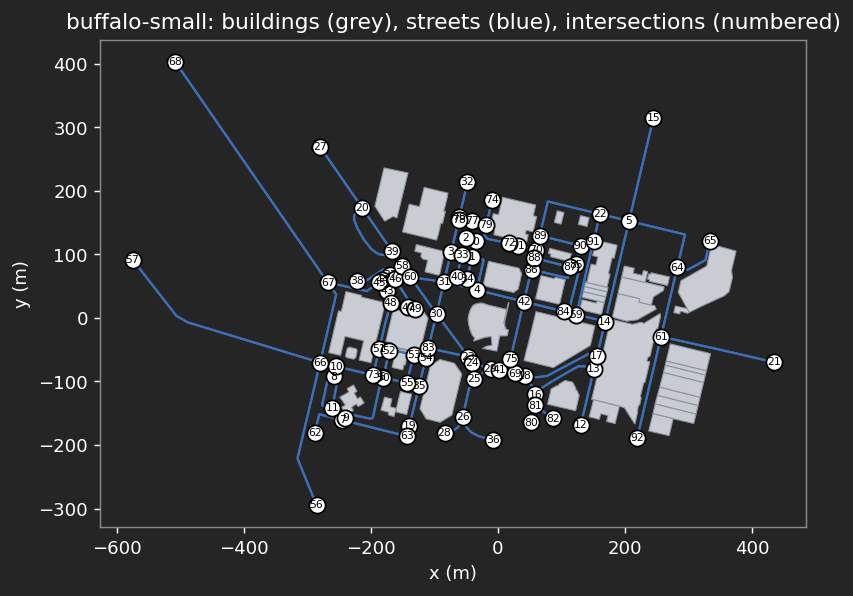
The map shows numbered intersections
No red error text under any cell
Symptom
Recovery
No module named 'shasta'
Wrong kernel: pick Python (smc) at the top right
No module named 'live_play'
live_play.py is not in the notebook’s folder
The picture does not respond
Click the picture once, then use the mouse and keys
A blank picture
Run the cell again and wait a second
Cannot load an actor multiple times
Rerun the whole cell, not only its last line
The server does not open
Ask a helper; share a neighbor’s screen meanwhile
Everyone with a map on screen is ready for Part Three.
Part ThreePut a Human in the Loopthe built-in interface, or your ownshasta gui → SwarmCommander → your interface
Why Human–SwarmOpen the NotebookHuman in the LoopMeasure & Extend
Play It Yourself
Open Step 3 of the notebook, Human in the loop
RunShift+Enter, then click the picture so it receives your mouse
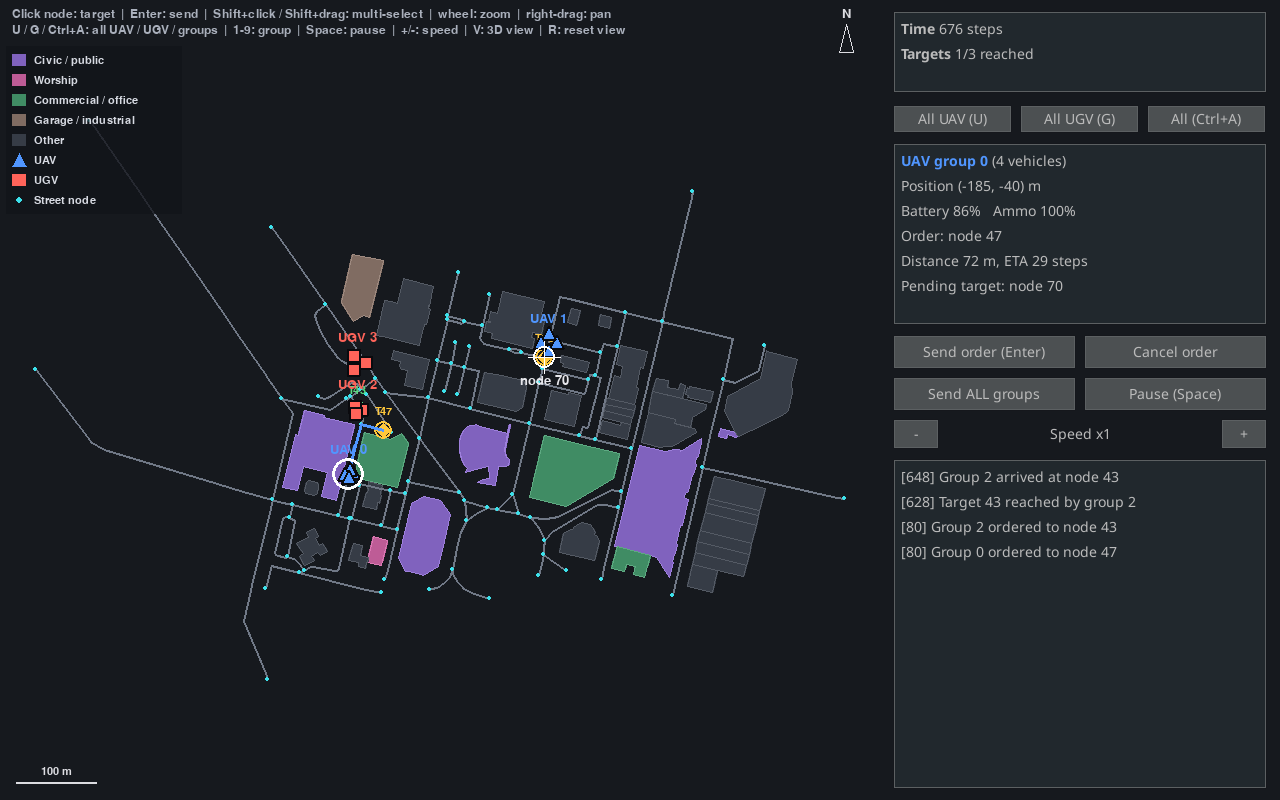
Command Click a group’s marker, click a street node, press Enter
Watch The groups follow the streets; the targets are the yellow markers
Stop Press Stop to end and see how many targets you reached
You should see this: the map and the swarm on the left, the status and event log on the right.
The Controls
Click the picture first. The mouse and keys then go to the interface.
clickor1–9Pick a group — click its marker, or press its number
clickPick a target — click near a street node; a white cross marks it
EnterSend the group — or the Send order button, or double-click the node
ShiftSelect several groups — shift-click their markers, or shift-drag a box
wheelZoom the mapdragPan with the right button
SpacePause / resume
-+Slow down / speed up
V3D camera view, follows the selected group
Options for your study are numbers in the notebook’s Step 4: vehicles, targets, time, and the seed that repeats the targets.
One Seam: SwarmCommander
The interface is a thin window on SwarmCommander, which has no display dependency. Anything that can call it can be the human:
Built-in interface the window you just saw
Scripted operator a policy that plays the human
AI advisor suggests or issues orders
Your interface a web page, joystick, VR
from shasta.interaction import Mission, SwarmCommandercommander = SwarmCommander(env, Mission.random(env.core.get_map(), 2, seed=0))commander.send(0, commander.mission.targets[0]) # the human's orderscommander.send(1, commander.mission.targets[1])whilenot commander.mission.is_over(commander.step_count): commander.update() # advance one tickprint(commander.events) # what happened, and when
Run it in the notebook — Step 3’s No human needed cell plays a whole mission this way, with a scripted operator and no window. Set headless=False in load_config to watch it in the pybullet 3D window.
No Human Required
You just commanded the swarm by hand. The same environment runs with nobody at the keyboard.
notebook · Step 2an order, with no human
obs, info = env.reset()obs, reward, terminated, truncated, info = env.step({0: target})whilenot terminated: obs, reward, terminated, truncated, info = env.step(None)
Run Step 2, the cell called Order a group, with no human.
Would a learning agent change this loop?
What you get
1The Gym APIreset() and step(action), the interface RL libraries expect
2An order is the action{group: node}; None means keep going
3No window PyBullet runs headless and the mission runs as fast as it can compute
A person, a script, or an RL agent can command the swarm: one environment, one interface.
The PyBullet World
SHaSTA’s physics is PyBullet: no window needed, yet you can reach in.
Headless PyBullet runs in DIRECT mode: a trip across the map takes a fraction of a second
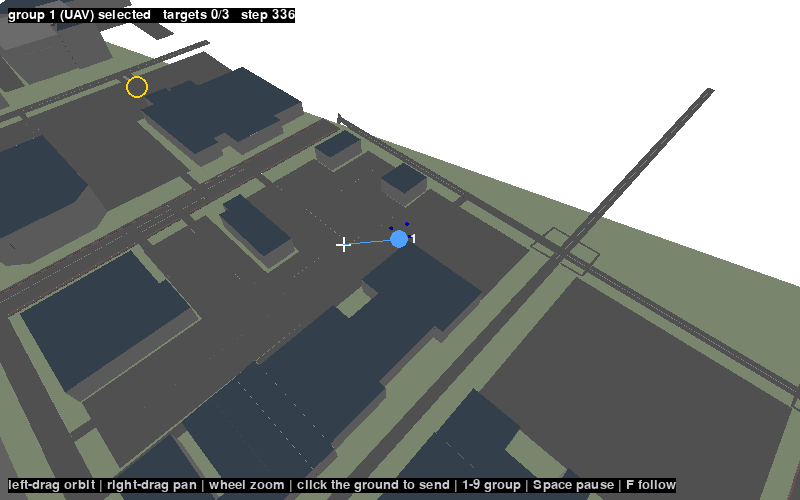
RendergetCameraImage draws the 3D scene to an image, so a browser can show it
Interact A click becomes a ray into the world; where it meets the ground, the nearest street node is the order
Try it Step 3, Interact with the PyBullet world: drag to look around, click the ground to send the selected group
The white cross is the node that was clicked.
What You Can Customize
Every setting is a number. Change them and play your own.
notebook · Step 4the build-your-own cell
UAVS, UGVS =4, 3# vehicles in each groupSPEED =2.5# metres per secondTARGETS, RADIUS =3, 12.0# targets, and how close countsTIME_LIMIT =2500# simulation stepsSEED =0# the same targets every run
Run Change the numbers, run the cell, and play.
How does the operator’s job change?
What each one changes
1Vehicles More to supervise: more load on the operator
2Targets and radius More, or harder to reach
3Time limit Less time, more pressure
4Seed The same targets, so trials are comparable
Build a Map of Anywhere
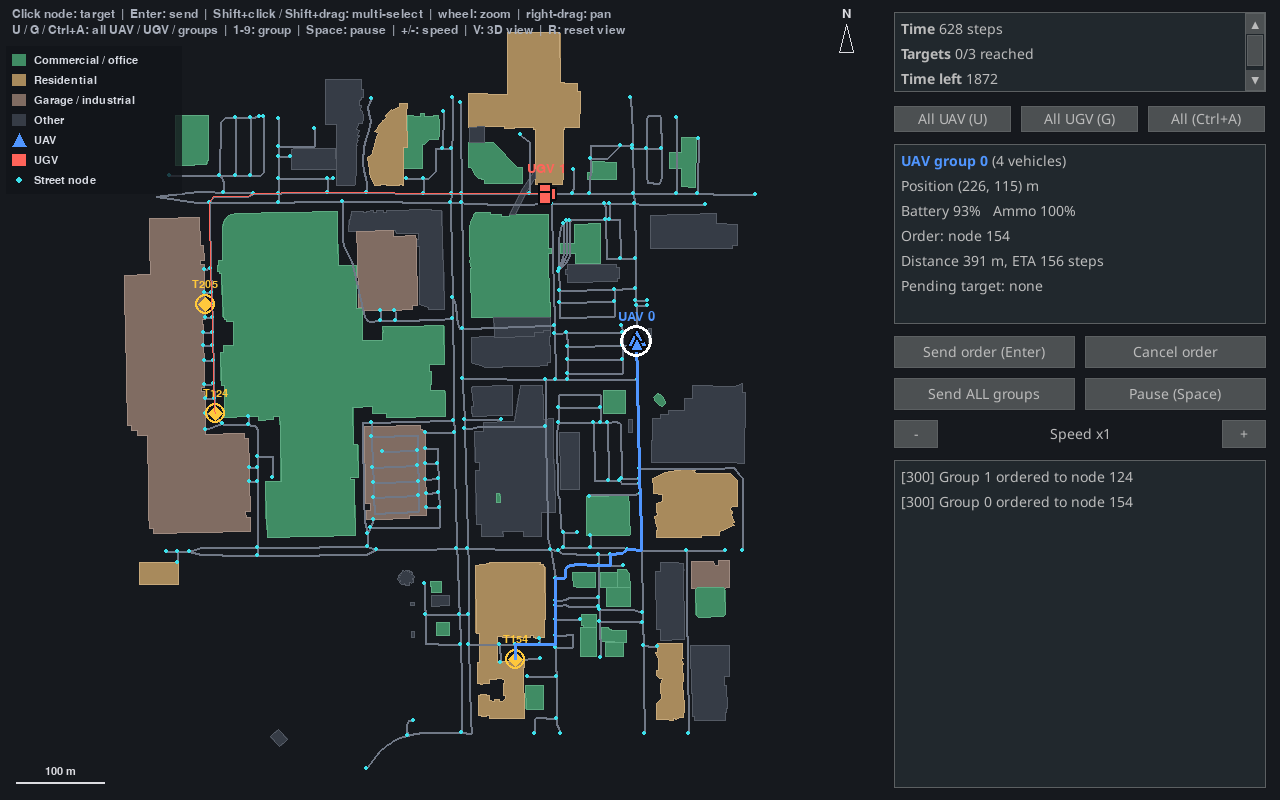
Any place in OpenStreetMap becomes a SHaSTA map in a few seconds.
Play The same interface, on your own campus or city
Which place would you study?
Downtown Bellevue, built in the notebook: 243 intersections.
Break · 10 minutes
Take a Break
Next · Part Four: Measure the Human, Then Extend
Part FourMeasure the Human, Then Extendone clock for everything the person and the swarm doevents → LSL → recorder → analysis
Why Human–SwarmOpen the NotebookHuman in the LoopMeasure & Extend
Why LSL
Lab Streaming Layer is the open-source standard for synchronising data from many devices and programs. SHaSTA’s paper builds its data recording on it.
One stream per source Each device or program publishes a stream: EEG, an eye tracker, event markers.
One clock Every sample is time-stamped on a shared clock, so streams line up without extra cleaning.
One recording A recorder such as LabRecorder saves every stream together for analysis.
In the paper’s study, 20 participants commanded 3 UAV and 3 UGV platoons while EEG, eye tracking and game events were recorded through LSL. A session looks like this:
1Start streams
Start each device’s LSL stream.
2Run
Run the scenario: the interface, or your own operator.
3Record
Record every stream in one file, then analyse.
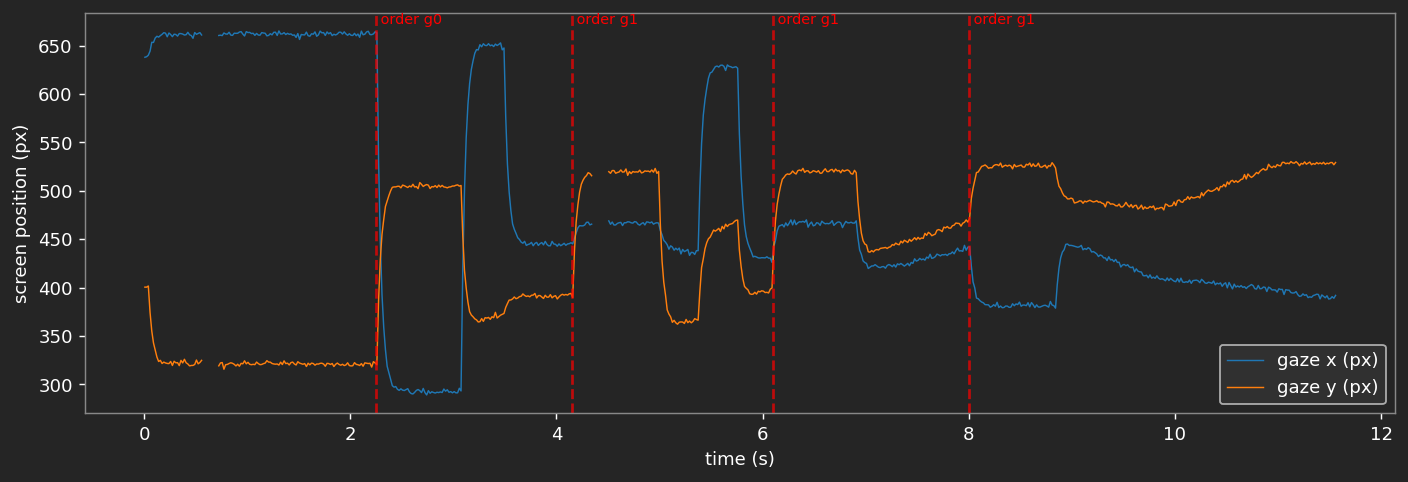
Log the Operator, See It on the Clock
Every order becomes a time-stamped marker, with its target on the screen.
 LSL time  marker
   0.00 s  session_start
   2.27 s  order  group 0 -> 10   (293, 505)
   3.60 s  order  group 1 -> 25   (467, 520)
   4.95 s  order  group 0 -> 40   (445, 391)
   7.05 s  session_end
Record Your Own Session
Play the operator. Your orders and the gaze go into one file.
1Markers
Every order you give, with its target on the screen.
2Gaze
Where the operator looks. Synthetic here: it looks at your last target, then follows the group.
3Recorder
Picks up exactly these two streams and writes one XDF file.
notebook · Step 7the last cell
play_shasta(gui, on_stop=finish) # play, press Stop, and the file is saved
A real eye tracker streams the same way: it publishes a Gaze stream from the laptop it is plugged into, and the recorder picks it up. See the appendix.
Analyse the Recording
Both streams share one clock, so a look lines up with an order.
Gaze over time Each red line is an order. The gaze jumps to the target right after it.
Where they looked Fixations and a heatmap on the interface.
Reaction to an order How long until the operator looks at the target, and for how long.
Four Things That Will Trip You Up
All four below are things this tutorial hit directly while testing every command and snippet in it — not hypothetical.
The map lives one level deeper than you’d guessconfig['experiment']['map_to_use'] = "buffalo-medium" — not config['core']['map_name'], which doesn’t exist.
Actors can’t be reused across environments Build a fresh groups dict for every new ShastaEnv(...) — reusing the same UAV/UGV objects raises ValueError: Cannot load an actor multiple times.
A group with no path can crash mid-mission If one group finishes well before another, continuing to call env.step(None) can raise IndexError in GoToNodeExperiment.apply_actions (intermittent — seen once in three runs in this tutorial). Give every group a similar-length route until this is fixed upstream.
Mission.random’s count should match your group countMission.random(map, 3, seed=0) against a two-group env leaves a target unassigned to any real group — mission.is_complete() then never returns True, even after every group you actually sent has arrived.
Build Your Own Experiment
Subclass GoToNodeExperiment, add your own rules, and compare strategies.
notebook · Step 5abridged
class TargetCollector(GoToNodeExperiment):def apply_actions(self, actions, core): ... # pick the next node with the strategy, fly to itdef get_done_status(self, observation, core): ... # done when every node has been visiteddef compute_reward(self, observation, core):return (1.0ifself.arrived_now else0.0) -0.001
Run Step 5, then add a strategy of your own.
Two strategies, the same five nodes
Strategy
Steps
Distance
Reward
nearest
6023
2828 m
-1.02
random
6832
3196 m
-1.83
1Your rules What the vehicles do, what is observed, when it ends
2A reward +1 for each node, a small cost for each step
Open Discussion
1Human–Swarm Teaming What human–swarm teaming question would you ask first, and what would you change in the map, the mission or the number of vehicles to ask it?
2Human and autonomy Which decisions should the person keep and which should the swarm make on its own, and how would you tell good teaming from an operator who just follows?
3Sense the human Which physiological signals, and which swarm events, would you use to close the loop?
[gui] adds the human interface; -e means edits apply without reinstalling
3Notebook packages
For LSL, the recording, and the browser interface
4Open the notebook
Start Jupyter from the notebooks folder
Not on PyPI yetpip install "ihuman-shasta[gui]" fails with “No matching distribution found.” Install from a clone as above. The notebook asks for the kernel: choose Python 3 (ipykernel). shasta gui opens the interface in its own window.
Record a Real Study on a Laptop
A USB eye tracker cannot plug into the server, so a real recording runs on the tracker’s laptop.
on the tracker’s laptopin notebooks/
python tobii_to_lsl.py --width 1920 --height 1080 # the Tobii tracker -> an LSL "Gaze" streampython shasta_gui_lsl.py --map buffalo-small # the real interface + an LSL "Markers" stream# LabRecorder: Update, select both streams, Start, run the task, Stop
Then LabRecorder writes one .xdf file. Upload it next to the notebook, set XDF_PATH in Step 8, and run the analysis unchanged.
Caveattobii_to_lsl.py and shasta_gui_lsl.py have not been run against real hardware in this repository: check them on your own setup first.